Embedding in an iFrame
Prerequisites
A pair of API key ID and API key secret.
In some contexts it may be necessary to embed the signing environment inside a host page, using an iframe, for example.
This can be achieved using the fUrl provided in the signature creation API call.
Creating the host page
The following example is a host HTML page template that allows you to generate the final HTML page once you have obtained the fUrl.
We used Handlebars for templating, but you can use whatever you want.
As you can see, the src of the iframe is set to a string containing {{fUrl}} that, which indicates the template variable to be replaced once we obtain the respective fUrl.
The following code makes the API call to create the signature and precompiles the HTML template that should then be served to the signer.
import {readFile} from "fs/promises";
import handlebars from "handlebars";

async function getPrecompiledHTML(): Promise<string> {

    // Create the signature
    const res = await fetch("https://api.webtrust.kopjra.com/v1/signatures", {
        headers: {
            "Content-Type": "application/json",
            "Accept": "application/json",
            "Authorization": "Basic NjhiOTkxMjEtYWIxNC00YzUwLWFlMzItNDgzZmQ4MWVkNWJkOnlBRG1YTDZ6IzNjVm4tWURPNmJsTWkybGY0MEpNMEdUcFpLVH5+Ujc1eUNEN3ZZVGU2fmJTdTJEOUZwNHFEVjl4RWhtVmRZSw==",
        },
        method: "POST",
        body: JSON.stringify({
            "signerFullname": "Luke Skywalker",
            "signatureType": "graphic",
            "isForensic": true,
            "locale": "en",
            "documents": [
                {
                    "name": "Death_Star_Self-Certification.pdf",
                    "contentBase64": "PDF_IN_BASE64",
                    "failSignature": "BOTTOM_RIGHT"
                }
            ]
        }),
    });

    if (res.ok) {
        // Read the fUrl
        const fUrl: string = (await res.json()).fUrl;

        // Read the handlebars HTML template containing the fUrl placeholder
        const htmlTemplate = await readFile("./templates/signature.html", "utf-8");

        // Precompile the HTML with the fUrl using handlebars
        const template = handlebars.compile(htmlTemplate);
        return template({ fUrl });
    } else {
        throw new Error(`Failed to create signature: ${res.status} ${res.statusText}`);
    }
}
import java.net.http.*;
import java.net.URI;
import java.nio.file.*;
import java.util.*;
import com.github.jknack.handlebars.Handlebars; // Handlebars.java
import com.github.jknack.handlebars.Template;
import com.fasterxml.jackson.databind.ObjectMapper;
import com.fasterxml.jackson.databind.JsonNode;
public class SignatureGenerator {
private static final String URL = "https://api.webtrust.kopjra.com/v1/signatures";
private static final String AUTH = "Basic NjhiOTkxMjEtYWIxNC00YzUwLWFlMzItNDgzZmQ4MWVkNWJkOnlBRG1YTDZ6IzNjVm4tWURPNmJsTWkybGY0MEpNMEdUcFpLVH5+Ujc1eUNEN3ZZVGU2fmJTdTJEOUZwNHFEVjl4RWhtVmRZSw==";
public static String getPrecompiledHTML() throws Exception {
// Build JSON payload
ObjectMapper mapper = new ObjectMapper();
Map<String, Object> documents = new HashMap<>();
documents.put("name", "Death_Star_Self-Certification.pdf");
documents.put("contentBase64", "PDF_IN_BASE64");
documents.put("failSignature", "BOTTOM_RIGHT");
Map<String, Object> bodyMap = new HashMap<>();
bodyMap.put("signerFullname", "Luke Skywalker");
bodyMap.put("signatureType", "graphic");
bodyMap.put("isForensic", true);
bodyMap.put("locale", "en");
bodyMap.put("documents", Collections.singletonList(documents));
String jsonBody = mapper.writeValueAsString(bodyMap);
// Create HTTP Client and Request
HttpClient client = HttpClient.newBuilder().build();
HttpRequest request = HttpRequest.newBuilder()
.uri(URI.create(URL))
.header("Content-Type", "application/json")
.header("Accept", "application/json")
.header("Authorization", AUTH)
.POST(HttpRequest.BodyPublishers.ofString(jsonBody))
.build();
// Send request and get response
HttpResponse<String> response = client.send(request, HttpResponse.BodyHandlers.ofString());
if (response.statusCode() == 200) {
JsonNode jsonResponse = mapper.readTree(response.body());
String fUrl = jsonResponse.get("fUrl").asText();
// Read template file
String templateContent = Files.readString(Paths.get("./templates/signature.html"));
// Compile with handlebars.java
Handlebars handlebars = new Handlebars();
Template template = handlebars.compileInline(templateContent);
return template.apply(Collections.singletonMap("fUrl", fUrl));
} else {
throw new RuntimeException("Failed to create signature: " + response.statusCode() + " " + response.body());
}
}
public static void main(String[] args) throws Exception {
System.out.println(getPrecompiledHTML());
}
}
import requests
import json
from pybars import Compiler

def get_precompiled_html():
    url = "https://api.webtrust.kopjra.com/v1/signatures"
    headers = {
        "Content-Type": "application/json",
        "Accept": "application/json",
        "Authorization": "Basic NjhiOTkxMjEtYWIxNC00YzUwLWFlMzItNDgzZmQ4MWVkNWJkOnlBRG1YTDZ6IzNjVm4tWURPNmJsTWkybGY0MEpNMEdUcFpLVH5+Ujc1eUNEN3ZZVGU2fmJTdTJEOUZwNHFEVjl4RWhtVmRZSw=="
    }
    body = {
        "signerFullname": "Luke Skywalker",
        "signatureType": "graphic",
        "isForensic": True,
        "locale": "en",
        "documents": [
            {
                "name": "Death_Star_Self-Certification.pdf",
                "contentBase64": "PDF_IN_BASE64",
                "failSignature": "BOTTOM_RIGHT"
            }
        ]
    }

    response = requests.post(url, headers=headers, json=body)
    if response.status_code == 200:
        fUrl = response.json().get("fUrl")
        with open("./templates/signature.html", "r", encoding="utf-8") as file:
            html_template = file.read()

        compiler = Compiler()
        template = compiler.compile(html_template)
        rendered_html = template({"fUrl": fUrl})
        return rendered_html
    else:
        raise Exception(f"Failed to create signature: {response.status_code} {response.text}")

# Example usage
if __name__ == "__main__":
    print(get_precompiled_html())
Once the precompiled HTML is served, the signer should see this
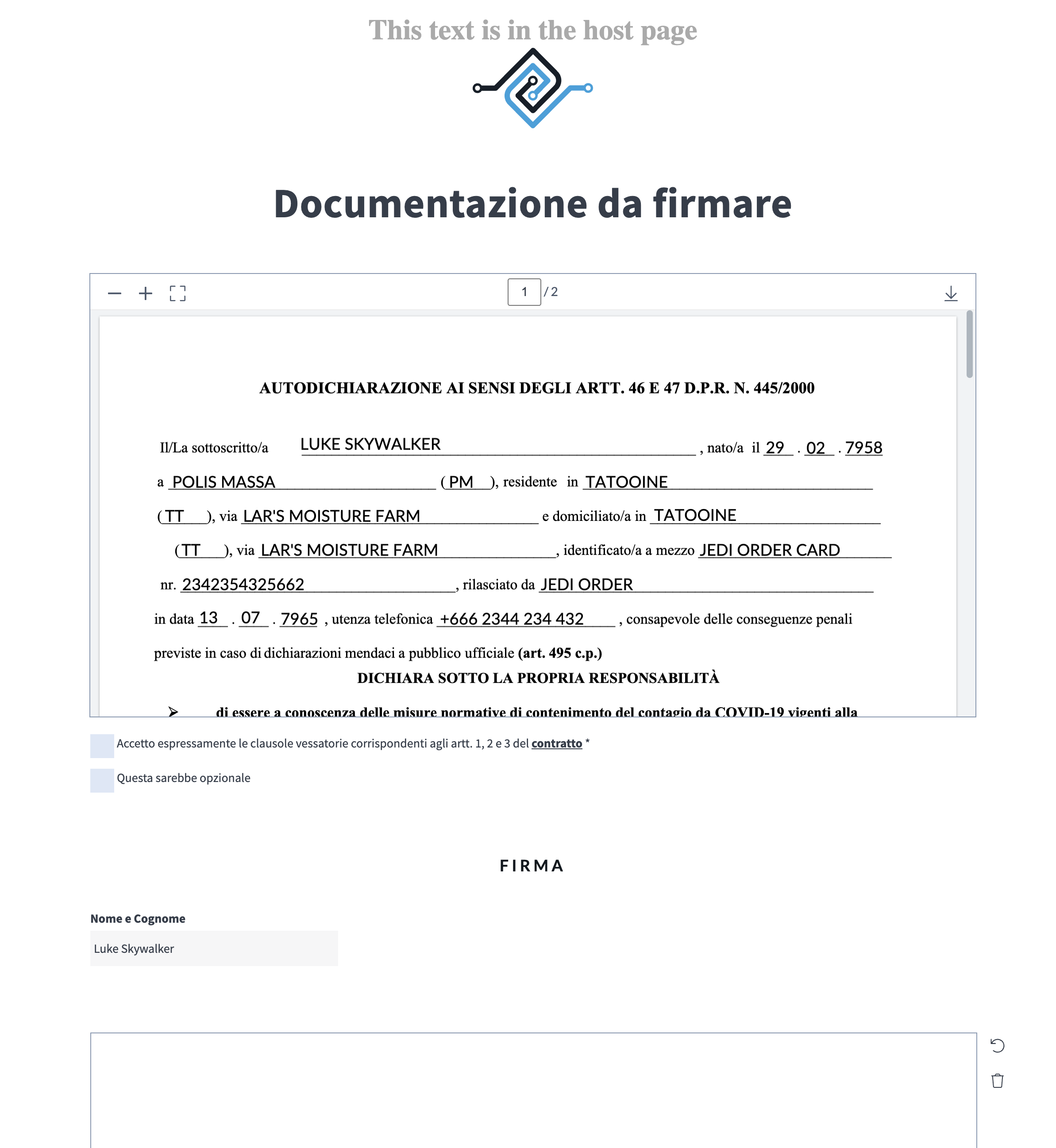
As you can see, the signer sees the signing environment opened inside the host web page.
AES support (or lack thereof)
Due to technical constraints regarding the identification of the signer using CIE or SPID, AES signatures don’t support being opened inside IFRAMEs.
This is because the identity providers always respond with the header: X-Frame-Options: DENY.
Therefore, the first step of the AES signature, the authentication of the signer, won't work, and thus the signature won’t work either.
Was this helpful?
Still need help? Share an idea