Creating a signature
Prerequisites
A pair of API key ID and API key secret, like, for example:
key ID: 68b99121-ab14-4c50-ae32-483fd81ed5bdkey secret: yADmXL6z#3cVn-YDO6blMi2lf40JM0GTpZKT~~R75yCD7vYTe6~bSu2D9Fp4qDV9xEhmVdYKSome credits for any of the workflows. For the sake of simplicity, we will assume that you have bought credits for the Document Simple Forensics API.
If one of the previous steps is missing, then go to First Steps and then to Making the first API Call.
Defining the payload
As mentioned in the prerequisites, we will be using the Document Simple Forensics API, so to create a signature, we will need to call the endpoint:
POST https://api.webtrust.kopjra.com/v1/signaturesThe headers that we need to specify are:
Content-Type: "application/json"
Accept: "application/json"
Authorization: Basic NjhiOTkxMjEtYWIxNC00YzUwLWFlMzItNDgzZmQ4MWVkNWJkOnlBRG1YTDZ6IzNjVm4tWURPNmJsTWkybGY0MEpNMEdUcFpLVH5+Ujc1eUNEN3ZZVGU2fmJTdTJEOUZwNHFEVjl4RWhtVmRZSw==
The Authorization header above is just an example, so it won’t work; go to Making the first API to generate your own.
The Body
Now let’s dig into the body of the call. Since this is our first signature, we will create the minimum possible body. Let’s go straight into it.
{
  "signerFullname": "Luke Skywalker",
  "signatureType": "graphic",
  "isForensic": true,
  "locale": "en",
  "documents": [
    {
      "name": "Death_Star_Self-Certification.pdf",
      "contentBase64": "PDF_IN_BASE64",
      "failSignature": "BOTTOM_RIGHT"
    }
  ],
  "otp": {
    "sms": "+39555555555"
  }
}
Using this minimal payload, we will create a signature that will apply a graphic signature at the bottom right of the last page of the specified PDF.
Let’s dissect the payload:
signerFullNameis the full name of the person that will sign the document.signatureTypeis the way the signer will input the signature; in this case, it isgraphic, meaning that the signer will draw the signature.isForensicsets whether the signature is forensic or not. Signatures that are not forensics will provide less information inside the final XML packet; for instance, it won't contain the PCAP and KEYS. Also, for non-forensic signatures, a dedicated singing environment won't be created. And since in this example we are talking about the Document Simple Forensic API,isForensicmust betrue.localedefines the language of the text inside the environment presented to the signer.documentsan array of objects, each containing the configuration of a PDF to be signednameis the name of the document (can only contain US-ASCII letters and/or numbers). It is just a label to identify the document. Thisnamewill be shown in the signing environment.Even if the
namemustn't be unique in the scope of a signature, it is recommended to use unique names to avoid confusion.contentBase64is a base64-encoded payload of the PDF document. The PDF must be valid and not encrypted. In bash, you can use$ cat file.pdf | base64to get the base64 encoded content of a PDF namedfile.pdf. For more details and examples on converting the PDF to base64, go to Converting your PDF to base64.failSignatureindicates where to place the signature in case no criteria were satisfied. And since in this example we didn’t specify any criteria, this property must have a value; otherwise, the call will result in a400error.
otpdefines a way to send a one-time password to the signer.smsis the telephone number where the OTP will be sent via an SMS message.emailis the email address where the OTP will be sent.
If both
smsand email are specified,smswill be prioritised, and it will fall back to email only when the phone number specified insmsis not of a supported country.
Coding the call
Here are some examples of making the call using different languages/frameworks.
curl "https://api.webtrust.kopjra.com/v1/signatures"
  -X POST
  -d '{"signerFullname":"Luke Skywalker","signatureType":"graphic","isForensic":true,"locale":"en","documents":[{"name":"Death Star Self-Certification","contentBase64":"PDF_IN_BASE64","failSignature":"BOTTOM_RIGHT"}],"otp":{"sms":"+39555555555"}}'
  -H "Accept: application/json"
  -H "Content-Type: application/json"
  -H "Authorization: Basic NjhiOTkxMjEtYWIxNC00YzUwLWFlMzItNDgzZmQ4MWVkNWJkOnlBRG1YTDZ6IzNjVm4tWURPNmJsTWkybGY0MEpNMEdUcFpLVH5+Ujc1eUNEN3ZZVGU2fmJTdTJEOUZwNHFEVjl4RWhtVmRZSw=="
const res = await fetch("https://api.webtrust.kopjra.com/v1/signatures", {
    headers: {
        "Content-Type": "application/json",
        "Accept": "application/json",
        "Authorization": "Basic NjhiOTkxMjEtYWIxNC00YzUwLWFlMzItNDgzZmQ4MWVkNWJkOnlBRG1YTDZ6IzNjVm4tWURPNmJsTWkybGY0MEpNMEdUcFpLVH5+Ujc1eUNEN3ZZVGU2fmJTdTJEOUZwNHFEVjl4RWhtVmRZSw==",
    },
    method: "POST",
    body: JSON.stringify({
      "signerFullname": "Luke Skywalker",
      "signatureType": "graphic",
      "isForensic": true,
      "locale": "en",
      "documents": [
         {
            "name": "Death_Star_Self-Certification.pdf",
            "contentBase64": "PDF_IN_BASE64",
            "failSignature": "BOTTOM_RIGHT"
         }
      ],
      "otp": {
         "sms": "+39555555555"
      }
    }),
});
console.log(await res.json());
using System;
using System.Net.Http;
using System.Net.Http.Headers;
using System.Text;
using System.Threading.Tasks;
class Program
{
static async Task Main(string[] args)
{
using (HttpClient client = new HttpClient())
{
// Set the base URL
string url = "https://api.webtrust.kopjra.com/v1/signatures";
// Add headers
client.DefaultRequestHeaders.Accept.Add(new MediaTypeWithQualityHeaderValue("application/json"));
client.DefaultRequestHeaders.Add("Authorization", "Basic NjhiOTkxMjEtYWIxNC00YzUwLWFlMzItNDgzZmQ4MWVkNWJkOnlBRG1YTDZ6IzNjVm4tWURPNmJsTWkybGY0MEpNMEdUcFpLVH5+Ujc1eUNEN3ZZVGU2fmJTdTJEOUZwNHFEVjl4RWhtVmRZSw==");
client.DefaultRequestHeaders.Add("Content-Type", "application/json");
// Define the request body
var requestBody = new
{
signerFullname = "Luke Skywalker",
signatureType = "graphic",
isForensic = true,
locale = "en",
documents = new[]
{
new
{
name = "Death_Star_Self-Certification.pdf",
contentBase64 = "PDF_IN_BASE64",
failSignature = "BOTTOM_RIGHT"
}
},
otp = new
{
sms = "+39555555555"
}
};
// Convert the request body to JSON
var jsonBody = Newtonsoft.Json.JsonConvert.SerializeObject(requestBody);
// Make the HTTP POST request
var content = new StringContent(jsonBody, Encoding.UTF8, "application/json");
HttpResponseMessage response = await client.PostAsync(url, content);
if (response.IsSuccessStatusCode)
{
// Parse the JSON response
string jsonResponse = await response.Content.ReadAsStringAsync();
Console.WriteLine(jsonResponse);
}
else
{
Console.WriteLine($"Error: {response.StatusCode}");
}
}
}
}
import java.io.BufferedReader;
import java.io.InputStreamReader;
import java.net.HttpURLConnection;
import java.net.URL;
import java.nio.charset.StandardCharsets;
import org.json.JSONObject;

public class Main {
    public static void main(String[] args) throws Exception {
        // Define the URL
        String urlString = "https://api.webtrust.kopjra.com/v1/signatures";
        URL url = new URL(urlString);

        // Open a connection to the URL
        HttpURLConnection connection = (HttpURLConnection) url.openConnection();
        connection.setRequestMethod("POST");
        connection.setRequestProperty("Content-Type", "application/json");
        connection.setRequestProperty("Accept", "application/json");
        connection.setRequestProperty("Authorization", "Basic NjhiOTkxMjEtYWIxNC00YzUwLWFlMzItNDgzZmQ4MWVkNWJkOnlBRG1YTDZ6IzNjVm4tWURPNmJsTWkybGY0MEpNMEdUcFpLVH5+Ujc1eUNEN3ZZVGU2fmJTdTJEOUZwNHFEVjl4RWhtVmRZSw==");

        // Define the request body
        JSONObject requestBody = new JSONObject();
        requestBody.put("signerFullname", "Luke Skywalker");
        requestBody.put("signatureType", "graphic");
        requestBody.put("isForensic", true);
        requestBody.put("locale", "en");

        JSONObject otp = new JSONObject();
        otp.put("sms", "+39555555555");
        requestBody.put("otp", otp);

        JSONObject document = new JSONObject();
        document.put("name", "Death_Star_Self-Certification.pdf");
        document.put("contentBase64", "PDF_IN_BASE64");
        document.put("failSignature", "BOTTOM_RIGHT");

        requestBody.put("documents", new org.json.JSONArray().put(document));

        // Convert the request body to JSON
        String jsonBody = requestBody.toString();

        // Set the request body
        connection.setDoOutput(true);
        connection.getOutputStream().write(jsonBody.getBytes(StandardCharsets.UTF_8));

        // Get the response code
        int responseCode = connection.getResponseCode();
        if (responseCode == HttpURLConnection.HTTP_OK) { // Success
            // Read the response
            BufferedReader in = new BufferedReader(new InputStreamReader(connection.getInputStream()));
            String inputLine;
            StringBuilder response = new StringBuilder();

            while ((inputLine = in.readLine()) != null) {
                response.append(inputLine);
            }
            in.close();

            // Print the JSON response
            System.out.println(response.toString());
        } else {
            System.out.println("Error: HTTP response code " + responseCode);
        }

        // Disconnect the connection
        connection.disconnect();
    }
}
import requests
import json

def main():
    # Define the URL
    url = "https://api.webtrust.kopjra.com/v1/signatures"

    # Set headers
    headers = {
        "Content-Type": "application/json",
        "Accept": "application/json",
        "Authorization": "Basic NjhiOTkxMjEtYWIxNC00YzUwLWFlMzItNDgzZmQ4MWVkNWJkOnlBRG1YTDZ6IzNjVm4tWURPNmJsTWkybGY0MEpNMEdUcFpLVH5+Ujc1eUNEN3ZZVGU2fmJTdTJEOUZwNHFEVjl4RWhtVmRZSw=="
    }

    # Define the request body
    requestBody = {
        "signerFullname": "Luke Skywalker",
        "signatureType": "graphic",
        "isForensic": True,
        "locale": "en",
        "documents": [
            {
                "name": "Death_Star_Self-Certification.pdf",
                "contentBase64": "PDF_IN_BASE64",
                "failSignature": "BOTTOM_RIGHT"
            }
        ],
        "otp": {
            "sms": "+39555555555"
        }
    }

    try:
        # Make the POST request
        response = requests.post(url, headers=headers, json=requestBody)

        if response.status_code == 200:
            # Print the JSON response
            print(response.json())
        else:
            print(f"Error: HTTP response code {response.status_code}")
    except requests.exceptions.RequestException as e:
        print(f"An error occurred: {e}")

if __name__ == "__main__":
    main()
As a response, you should receive the following json
{
  id: 13184,
  signerFullname: 'Luke Skywalker',
  signatureType: 'graphic',
  hasForcedSignaturePNG: false,
  extraChecks: null,
  assignationExpirationPeriod: 900,
  expirationPeriod: 2592000,
  expiresAt: '2025-04-13T10:37:00.000Z',
  userLandedAt: null,
  userTookoffAt: null,
  currentStatus: 'SUBSCRIBED',
  archetypeId: null,
  createdAt: '2025-03-14T10:37:00.000Z',
  updatedAt: '2025-03-14T10:37:00.000Z',
  tags: {},
  documents: [
    {
      id: 39329,
      name: 'Death_Star_Self-Certification.pdf',
      isSigned: false,
      signatureFieldsType: null,
      signatureFieldsNames: [],
      tags: null
    }
  ],
  deletedEvidence: false,
  isForensic: true,
  locale: 'en',
  rejectable: false,
  signatureCustomisations: null,
  pades: false,
  fUrl: 'https://api-dev.webtrust.kopjra.com:443/v1/i/eyJhbGciOiJIUzI1NiIsInR5cCI6IkpXVCJ9.eyJpX2lkIjoxMzE3OSwiaXNzIjoiaHR0cHM6Ly9hcGkuZ2F0ZXdheS5rb3BqcmEuY29tIiwiYXVkIjoiaHR0cHM6Ly9hcGkuZ2F0ZXdheS5rb3BqcmEuY29tIiwiaWF0IjoxNzQxOTQ4NjIxLCJleHAiOjE3NDQ1NDA2MjF9.N7HhxcqfYiUZeyHuW-X74IuSu--OeGmGyQn-59Lgt6E'
}
The Response
Right now, you need to pay attention to some key elements of the previous response
id: the unique identifier of the signature. That we can then use to retrieve it using the properGETAPI call.currentStatus: the state of the signature at the moment you received the response. See the Status Workflow Diagram for more details.fUrl: This is of the outmost importance, since, it is the URL to which you need to redirect the signer. This URL will resolve to the signing environment.
When the signer opens the fUrl of a Simple Forensic signature will be presented with the following page:
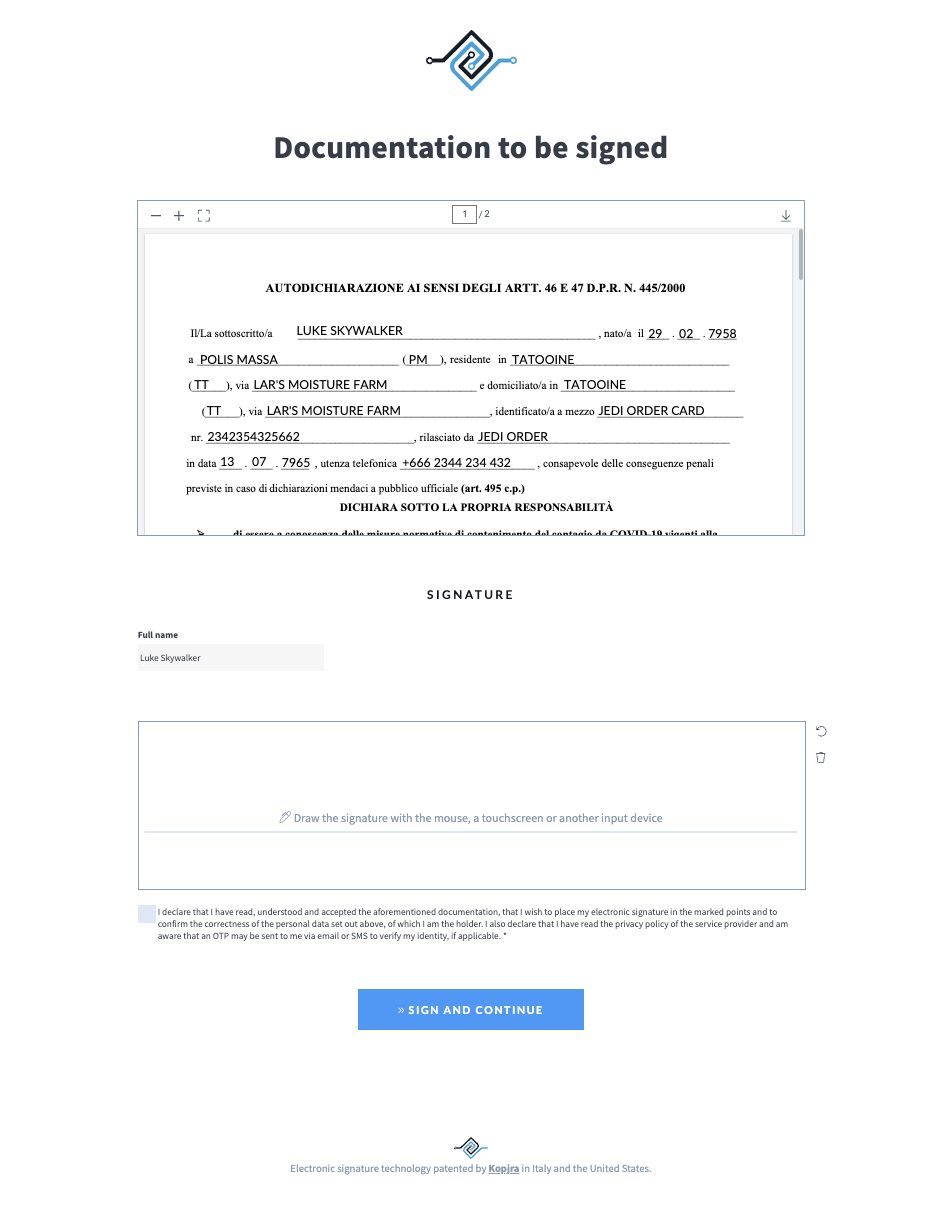
As you can see here, the signer must enter a graphic signature, tick a checkbox, and press the big blue button. After that, an OTP verification page will be shown, and finally an outcome page that can eventually redirect to a configured URL.
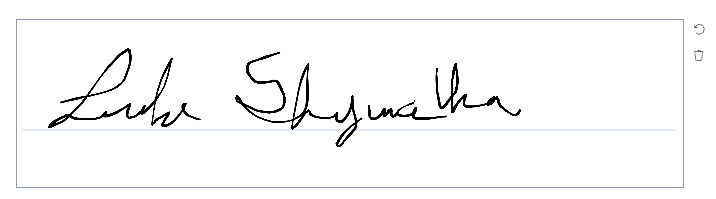
When the user finishes the signature process, the system will start concluding the signature (this entails preparing the PDF and the Forensic Evidence XML); this could take some seconds.
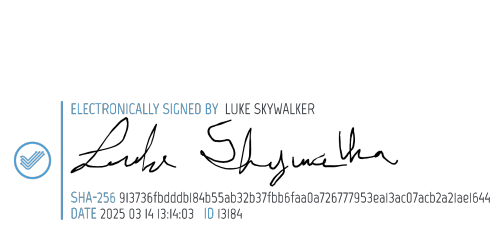
As soon as the signature is in status CONCLUDED, you can get the URL to download the signed documents. The following is an example of an applied signature.
Format preservation
Sometimes the PDF can be saved using a PDF/A standard. PDF/A is an ISO-standardized subset of the PDF format designed specifically for long-term archiving and preservation of electronic documents, ensuring they can be reliably viewed in the future with the same visual appearance. To achieve this, it requires the file to be self-contained (for example by embedding fonts and key resources) and forbids features that might hinder future accessibility, such as certain multimedia, encryption, or external dependencies.
Web Trust always preserve the format of the original PDF file (e.g. if the input file was saved using the PDF/A-2b standard, the output file will be saved using the exactly same standard)
Next steps
From here, you can customise and parametrise your signature and dabble with other APIs. Follow the recepies for examples of different use cases or dive into the workflow specifications.
Was this helpful?
Still need help? Share an idea